

Renewing your tenancy agreement in Dubai no longer requires lengthy paperwork or multiple visits to service centres. Thanks to digital government services, tenants can now complete much of the renewal process through the Dubai REST app, making tenancy management faster and more convenient.
Whether you’re renewing your lease for another year or updating your tenancy records after signing a new agreement, understanding the digital renewal process helps avoid unnecessary delays. With the correct documents prepared in advance, many users can complete the application in just a few minutes.
This Ejari renewal guide explains the complete online renewal process, required documents, expected fees, and answers common questions about renewing your Ejari through the Dubai REST app.
What Is the Dubai REST App?
The Dubai REST app is the official property services platform developed to provide residents, landlords, and property owners with access to a wide range of real estate services.
The platform allows users to manage various property-related activities digitally, including tenancy-related services.
Depending on your property and tenancy status, the app may provide access to:
- Property information
- Tenancy services
- Ejari services
- Real estate transactions
- Property documentation
- Digital government services
Using official digital platforms helps simplify administrative procedures while reducing paperwork.
Why Renew Ejari Through the Dubai REST App?
Many tenants now prefer digital renewal because of its convenience and accessibility.
Some of the benefits include:
- Online submission
- Reduced paperwork
- Faster document management
- Secure digital records
- Convenient payment options
- Access from anywhere
For many residents, online renewal is quicker than visiting a service centre in person.
Documents Needed Before You Begin
Preparing your documents before starting the renewal helps reduce interruptions during the application.
Commonly required documents may include:
- Renewed tenancy contract
- Emirates ID
- Passport copy
- Property information
- Landlord details
- Supporting tenancy documents
Applicants should review all information carefully before uploading files.
7-Step Ejari Renewal Process
Seeing the entire renewal process in one visual makes it easier to understand each stage before starting your application.
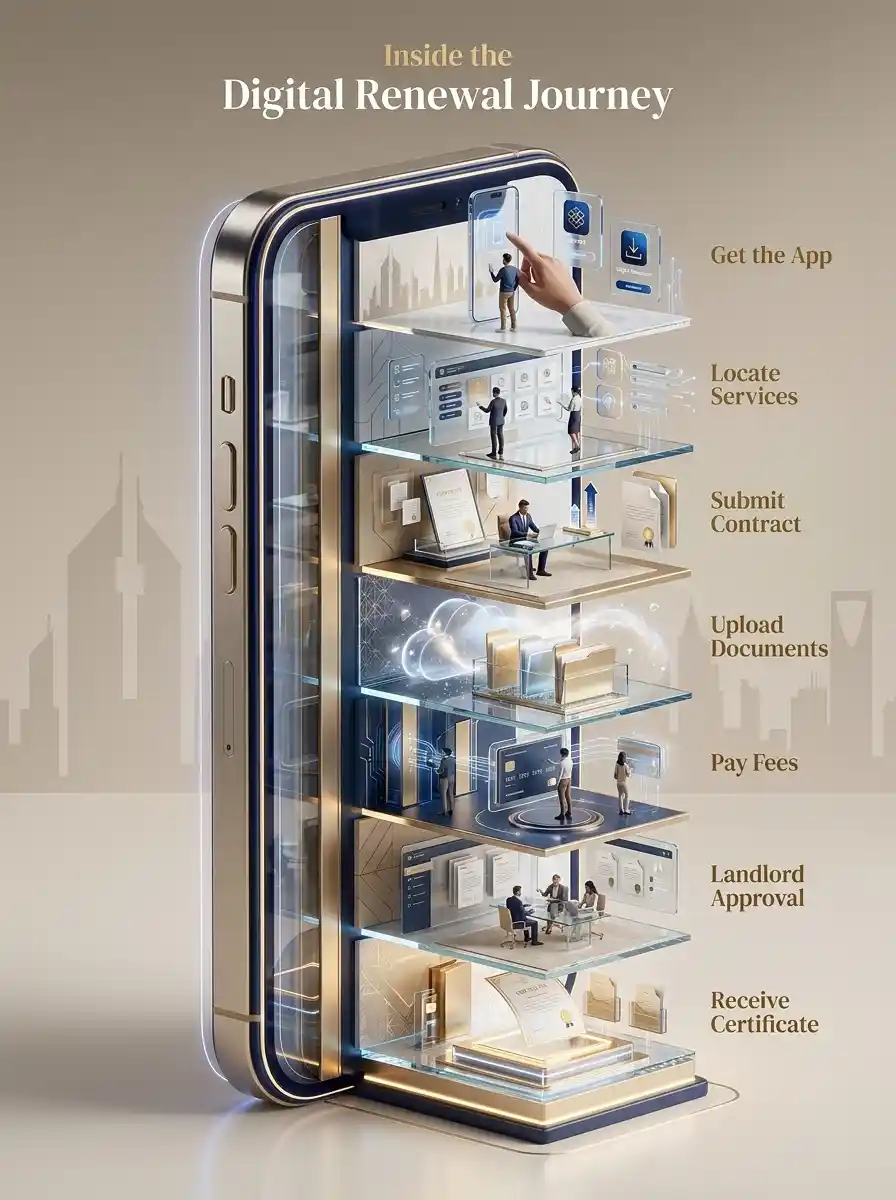
Step 1: Get the App
Download and install the official Dubai REST app if it is not already available on your device.
Ensure you can access your registered account before beginning the renewal process.
Step 2: Locate Ejari Services
Navigate to the tenancy or Ejari services section within the application.
Select the renewal option that matches your tenancy requirements.
Step 3: Submit Your Contract
Enter the required tenancy information and submit your renewed tenancy contract.
Applicants should verify that all details match the signed lease agreement.
Step 4: Upload Your Documents
Upload all supporting documents in clear and readable formats.
Poor-quality uploads may delay processing.
Step 5: Pay the Renewal Fees
Proceed to the payment section and complete the applicable renewal fee.
Payment confirmation is generally required before the application continues.
Step 6: Landlord Approval
Depending on the tenancy arrangement, landlord approval or verification may form part of the renewal process.
Applicants should monitor their application status for updates.
Step 7: Receive Your Certificate
Once the application has been reviewed and approved, the renewed Ejari certificate becomes available.
Applicants should download and securely store the updated certificate for future use.
How to Renew Ejari Through REST App
One of the most common questions asked by tenants is:
How to renew Ejari through REST app?
The process generally involves:
- Logging into the Dubai REST app
- Accessing Ejari services
- Uploading tenancy documents
- Completing payment
- Waiting for verification
- Downloading the renewed certificate
Having complete documentation available beforehand usually results in a smoother application.
What Documents Do I Need to Renew My Ejari?
Although requirements may vary slightly depending on the tenancy, applicants commonly prepare:
- Signed renewal tenancy agreement
- Emirates ID
- Passport copy
- Property information
- Supporting documents
Providing complete and accurate documentation helps reduce delays.
How Much Does It Cost to Renew an Ejari?
Another frequently asked question is:
How much does it cost to renew an Ejari?
Renewal costs may vary depending on:
- Government fees
- Service provider charges
- Registration channels
- Administrative services
Applicants should verify the latest official fees before submitting payment.
Common Mistakes That Delay Renewal
Several avoidable mistakes can slow the renewal process.
Uploading Incomplete Documents
Missing files often require resubmission.
Incorrect Tenant Information
Applicant information should match official identification documents.
Expired Supporting Documents
Ensure all identification documents remain valid.
Poor File Quality
Blurry or unreadable uploads may delay verification.
Reviewing your application before submission can help avoid these issues.
What Happens After Renewal?
Once your renewed Ejari certificate has been issued, it can be used for various tenancy-related services.

These may include:
- Utility services
- Family sponsorship
- Residence-related applications
- Government transactions
- Property administration
Keeping the updated certificate readily accessible helps simplify future applications.
A renewed Ejari certificate becomes the foundation for several important services that tenants commonly access throughout the year.
Why Use Official Digital Platforms?
Applicants should always complete digital tenancy services through official government-approved channels.
Using official platforms provides:
- Secure document handling
- Reliable processing
- Accurate tenancy records
- Regulatory compliance
- Official property services
For official tenancy registration guidance and property-related digital services, residents can refer to the Dubai Land Department (DLD). The Dubai REST app remains one of the primary platforms for managing Ejari-related services digitally.
Why Professional Assistance May Still Be Helpful
While digital renewal is convenient, some applicants prefer professional assistance when:
- Renewing for the first time
- Managing complex tenancy arrangements
- Resolving documentation issues
- Correcting tenancy information
Professional guidance at Ejari Meydan can help reduce delays and improve application accuracy.
Complete Guide to Ejari Renewal in Meydan
If you are looking for more detailed information about renewing your tenancy registration in the area, our Complete Guide to Ejari Renewal in Meydan covers the renewal process, required documents, common mistakes, processing considerations, and other important aspects tenants should know. It is a useful resource for residents who want a broader understanding of Ejari renewal requirements before completing their application.
Conclusion
The Dubai REST app has made tenancy renewals significantly more convenient for Dubai residents. By following this Ejari renewal guide, preparing the required documents, and carefully reviewing your information before submission, you can complete the renewal process efficiently and minimize administrative delays.
Whether you’re renewing your tenancy for the first time or managing multiple rental properties, using official digital platforms helps ensure your records remain accurate and up to date. If you need expert assistance with online Ejari renewal or tenancy registration services, Ejari Meydan is ready to help.
FAQs
How do I renew Ejari through the REST app?
Log in to the Dubai REST app, access Ejari services, upload your renewal documents, complete payment, and wait for approval before downloading your updated certificate.
What documents do I need to renew my Ejari?
Commonly required documents include the renewed tenancy contract, Emirates ID, passport copy, and other supporting tenancy documents.
How do I do Ejari online step by step?
The general process involves accessing the Dubai REST app, selecting Ejari services, submitting your tenancy information, uploading documents, paying the applicable fees, and downloading the renewed certificate.
How much does it cost to renew an Ejari?
The total cost depends on the applicable government fees, service charges, and the registration method used. Applicants should check the latest official fee schedule before applying.
Is the Dubai REST app the official platform for digital Ejari services?
Yes. The Dubai REST app is one of the official digital platforms that provides access to tenancy-related and property services in Dubai.